
Watch Mempool for a transaction with a Token
In this example we will use Adder to get a log notification when there is a transaction in our mempool that includes a certain token or asset that we want to track.
⚠️ Mempool is used for pre-accepted transactions. If higher assurance is needed, use input-chainsync.
✅ For this guide we assume you are running Adder on same machine as your node. If not see our Adder Linux Guide.
Let us start by picking an asset that we want to follow.
Step 1 - Get Asset ID / Fingerprint
Section titled “Step 1 - Get Asset ID / Fingerprint”In order to filter by a Token that we want to watch we need the asset id also known as the asset fingerprint. We can use tools like cexplorer.io to search by a token name so we can get the asset id / asset fingerprint.
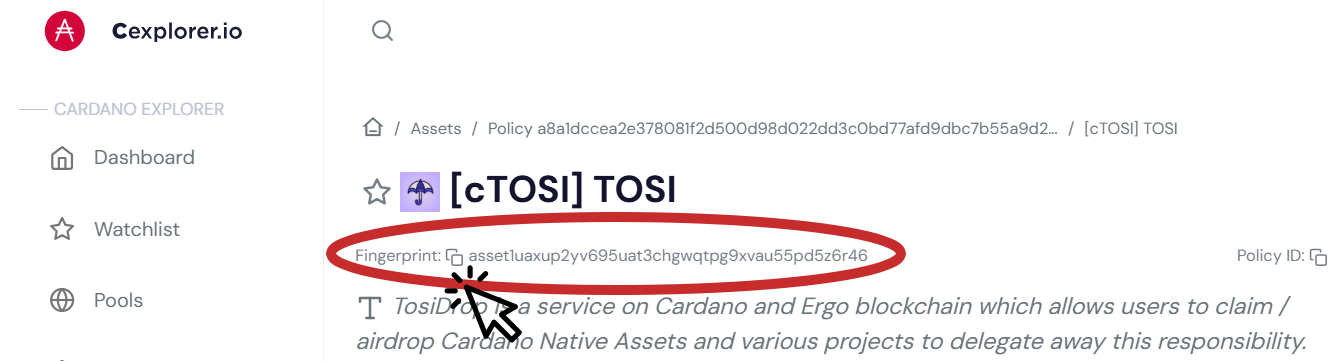
📝 Make note of the asset fingerprint, we will need it later. For this example, we used the following asset id / asset fingerprint:
asset1uaxup2yv695uat3chgwqtpg9xvau55pd5z6r46Step 2 - Selecting Adder Commands
Section titled “Step 2 - Selecting Adder Commands”Now that we have our asset id / fingerprint that we want to monitor, we are ready to look at the filters and commands we will use. For this example, we will use:
- Input Mempool
- Input Mempool Socket Path
- Filter Asset
- Filter Type
- Output
Input Mempool
Section titled “Input Mempool”We need to specifiy that the input we want to use is our mempool by using the following flag:
--input mempoolInput Mempool Socket Path
Section titled “Input Mempool Socket Path”We need to specifiy socket path for the mempool of a Cardano Node that we are running Adder on.
⚠️ Adjust the file path below to match your path
--input-mempool-socket-path /home/user/cardano-my-node/db/socket💡 Tip: To find the path to your node socket run the following command:
echo $CARDANO_NODE_SOCKET_PATHFilter Asset
Section titled “Filter Asset”We can use the asset fingerprint from above for cTOSI to have Adder track transactions with that fingerprint by using the following filter:
--filter-asset asset1uaxup2yv695uat3chgwqtpg9xvau55pd5z6r46Filter Type - Transaction
Section titled “Filter Type - Transaction”For this example, we want to get alerts when a transaction occurs using the cTOSI asset id / fingerprint. To do this we will add the following filter:
--filter-type input.transactionOutput
Section titled “Output”We want the output events to console using logger. So that when a transaction that contains cTOSI occurs, we will receive log to console. To do this we will add the following flag:
--output logStep 3 - Putting it All Together
Section titled “Step 3 - Putting it All Together”To get a log notification when a transaction includes the Tosidrop token cTOSI, we will run the following command in our command prompt:
⚠️ Please adjust socket path
./adder --input mempool --input-mempool-socket-path /home/user/cardano-my-node/db/socket --filter-type input.transaction --filter-asset asset1uaxup2yv695uat3chgwqtpg9xvau55pd5z6r46 --output logCongratulations!
Section titled “Congratulations!”Anytime a transaction appears in our mempool containing cTOSI you will get a log event.

💡 TIP: You can get a list of all available commands by using the
-hor--helpflag.
See our other examples to see what else Adder can do and unlock the power of Adder 💪
- Example 1 - Watch My Wallet and get a Desktop Notification
- Example 2 - Watch a Token and get a Desktop Notification
- Example 3 - Watch an SPO and get an Alert in Discord
- Example 4 - Watch a Smart Contract for a Specific Asset ID and get a Desktop Notification
- Example 5 - Watch an DRep and get an Alert in Telegram
- Example 6 - Watch Mempool for a Transaction with a Token